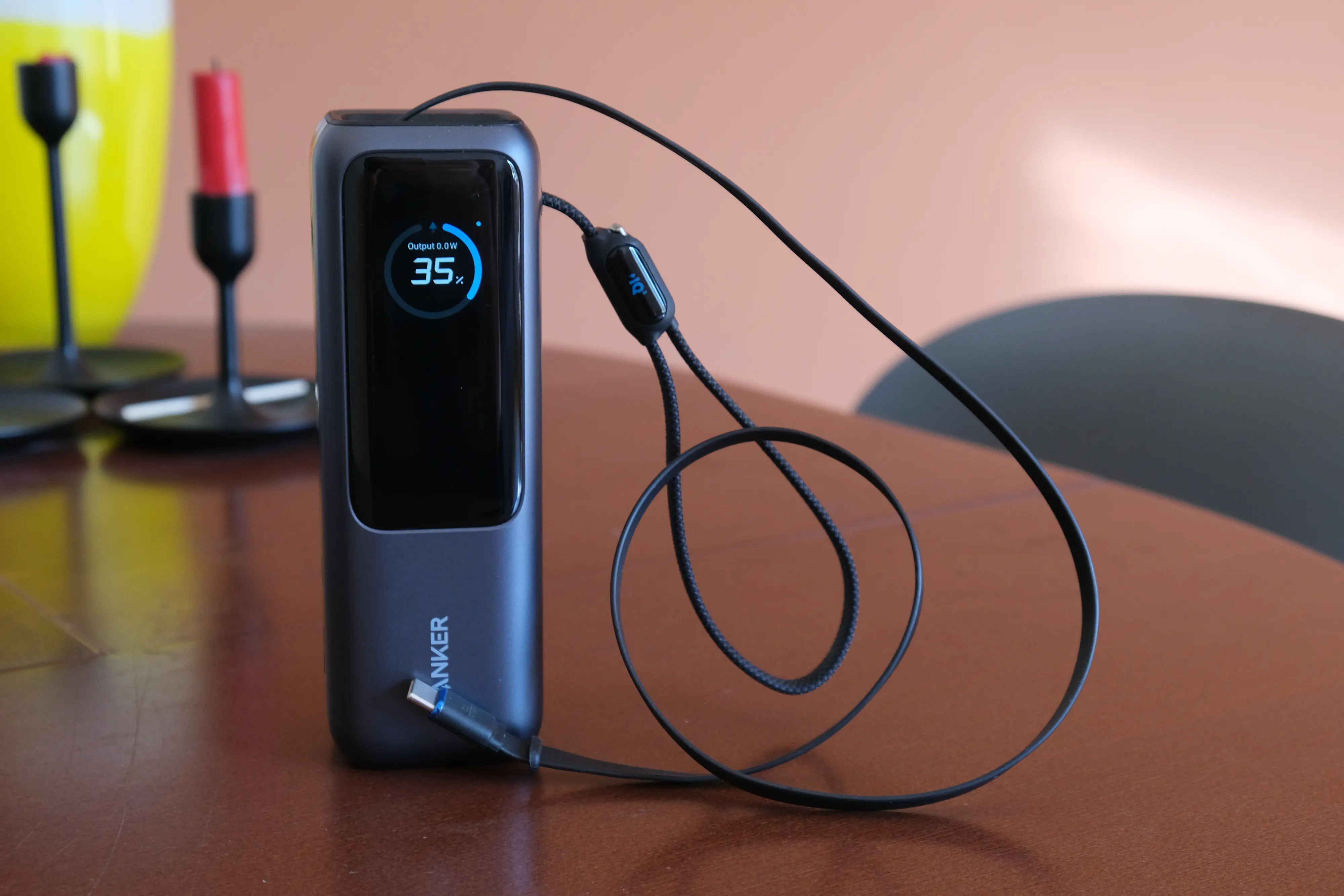
Anker’s new 25,000mAh Laptop Power Bank is a game-changer for one, simple reason: Built-in USB-C cables. I bought this power bank thinking the smaller size and enhanced display versus the older Anker 737 (my review of the Anker 737 is here) would be the big upgrades, but nope! Two built-in USB-C cables (one of which is retractable, the other doubling as a carrying strap) make this the best mid-size power bank on the market.
Anker Laptop Power Bank quick facts / specs
- Capacity: 25,000mAh (90Wh)
- Ports: 3x USB-C (2x with built-in cable, 1x as a port), 1x USB-A
- Cables: 1x retractable 2.3′ (70cm) flat rubberized USB-C cable, 1x “loop” 1′ (30cm) flat braided nylon USB-C cable
- Maximum power output: 165 Watts gross, 100 Watts per port (USB-C only; USB-A port limited to 33W)
- Maximum power input: 100 Watts
- Recharge time: Around 80-90 minutes (with 100W charger)
- Weight: 1.31lbs (0.595kg)
- Dimensions: 6.18″L x 1.93″W x 2.12″D (157mm x 49mm x 54mm)
- Price: $110 MSRP, frequently on sale for $90-100 retail
- Model number: A1695
Anker Laptop Power Bank pros
- Built-in USB-C cables: Seriously, how did I ever live without these? Two built-in USB-C cables mean you can pack this in a bag and be fully set to charge your gadgets on the go —and that you won’t lose your cables anywhere.
- Very high charging output and input: At 100W max per USB-C port, the Anker Laptop Power Bank is fast enough for, well, most laptops! It also can recharge at up to 100W, which is super fast. And the USB-A maxes at 33W, which is surprisingly quick (most are 15-18W).
- Good capacity: 25,000 mAh is enough to charge most iPhones 4 times or more, and will easily get even most large laptops from 0-50% (quickly).
- Power display: I love the power display on Anker’s high-end power banks, and this new model adds temperature readout and battery health (with cycle count!) in addition to power input and output.
- Quality: This power bank feels well constructed, and is even a bit lighter and narrower than the older Anker 737.
Anker Laptop Power Bank cons
- Lower peak output: Compared to the older Anker 737, which maxes at 140W output and input over USB-C, this power bank is a bit slower (100W). But that’s not to be confused with “slow” — it still charges everything but workstation class laptops super quickly.
- Expensive: Some people just don’t like the idea of forking over $100 or more for a power bank. I get it. But this one at least comes with its own cables — that’s real added value!
- Overkill: For just a phone or even an iPad and a phone, the 165W total system output of this charger is well in excess of what you’ll ever need. There are far cheaper power banks with similar or even much higher capacity for substantially less money — they just don’t have super high power output or fancy extras like screens.
- Only one “empty” USB-C port: If you need to use multiple long USB-C cables with your power bank, this thing may be a no-go — you only get one “empty” USB-C port. The other two USB-Cs use built-in cables that cannot be detached. They are 2.3′ (70cm) and 1′ (30cm) long, respectively.
Anker Laptop Power Bank extended thoughts
I own and quite like Anker’s 737 power bank — it’s been my workhorse portable charger for a couple of years now. It’s great on airplanes, in a messenger bag or backpack, and it charges pretty much any gadget super quick! When I saw this new Anker Laptop Power Bank (which, by the way: Terrible product name, guys), I was a little skeptical — because it’s actually a downgrade in terms of power performance.

The Anker 737 can put out 140W of power (and charge at up to 140W) on each of its two USB-C ports. This new Laptop Power Bank tops out at 100W output and input (though can achieve 165W total system output when using multiple ports). I’m not charging anything at over 100 Watts — my MacBook Air 15 won’t take more than 80W or so, and I wouldn’t even bother trying to charge my 230W gaming laptop with a power bank this this thing. But, I could easily charge my iPhone, iPad, and MacBook Air 15 at the same time at full speed with this power bank. That’s absolutely going to be enough for 99% of use cases.
Let’s talk about those cables a bit: I’ve already said I love them. I love not needing to pack my own USB-C cables in my bag with me, I love that I can just grab this power bank off my desk and charge my phone or tablet anywhere in my apartment, any time, and I love that the flat nylon USB-C cable serves as a very handy carrying strap. The retractable cable (shown in the first image of this post) snaps back into the power bank easily, too.

The only real downsides to the built-in cables on the Anker Laptop Power Bank are that you’re stuck with that specific length of cable, you only get the one “empty” USB-C port, and there is of course some chance these cables could be damaged or fail. The damage issue, in my view, is probably the biggest risk here. The nylon cable that doesn’t retract inside the power bank feels very sturdy, and there’s a rubberized gasket where it attaches to the device to keep it from getting pinched too badly, but…. It’s still a cable hanging off the side of something. There’s always a chance it could get caught on something or smashed. But personally, I’m more than willing to take that chance for the convenience it provides.
As for the price of the Anker Laptop Power Bank, I think $100-110 is very reasonable for the level of performance and convenience on offer here. I got mine for closer to $90 on discount, so if you’re patient and wait for a sale, you might be able to save $10-20. Buy here.


Anker laptop power bank FAQs
Does the Anker Laptop Power Bank include a wall charger?
No. You’ll need to provide your own. The maximum recharge speed of the Anker Laptop Bank is 100W, which I verified with my own testing.
What wall charger should I use with the Anker Laptop Power Bank?
Any USB wall charger can charge the Anker Laptop Power Bank, but to charge it as quickly as possible, you’ll need a very powerful wall charger. I recommend at least a 65W USB-C PD charger; a 100W charger will give you some extra speed, but will cost considerably more.
Is there an updated version of the Anker Laptop Power Bank?
No, the Anker Laptop Power Bank is a new Anker product as of this writing (April 2025).
Should I buy the Anker Laptop Power Bank or the Anker 737?
Personally, I recommend the Anker Laptop Power Bank over the Anker 737 now. The 737 is great, but unless you really need the extra per-port output (140W, vs 100W on the Laptop Power Bank) or really prefer using your own USB-C cables, I can’t see a reason to go with the 737. Sure, it can technically charge and recharge faster, but the situations where that difference would matter are very few and far between.
Can I charge multiple devices with the Anker Laptop Power Bank?
Yes, the Anker Laptop Power Bank has four USB ports, and all four can charge devices simultaneously. However, connecting multiple devices limits the maximum output of the other ports (i.e., you cannot use more than 165W of output combined across the four ports).
Does the Anker Laptop Power Bank fast charge over USB-A?
“Fast” is relative. The Anker Laptop Power Bank’s maximum charge speed over USB-A is 33W, which is fast enough to quick charge an iPad Pro, but still relatively slow for something like a MacBook and most other laptops.
Can I take the Anker Laptop Power Bank on an airplane?
Yes, at 90Wh capacity, the Anker Laptop Power Bank meets guidelines for international travel in carry-on luggage.
One response to “Anker Laptop Power Bank review”
[…] Update: I now strongly recommend Anker’s new Laptop Power Bank (model A1695) over the Anker 737. Check out my review of the Anker Laptop Power Bank here. […]